
JetBrains PhpStorm: The Smart IDE for Modern PHP Development
JetBrains PhpStorm is a powerful integrated development environment created for professional PHP developers. It combines intelligent coding tools, advanced debugging, and seamless project management. Whether you build websites, APIs, or enterprise applications, PhpStorm helps improve productivity while reducing development time.
Why Choose JetBrains PhpStorm?
PhpStorm offers a complete coding experience with intelligent features designed for modern development workflows. It supports PHP, HTML, CSS, JavaScript, SQL, and many popular frameworks. Developers can manage complex projects more efficiently while maintaining clean, reliable, and secure code.
Intelligent Code Assistance
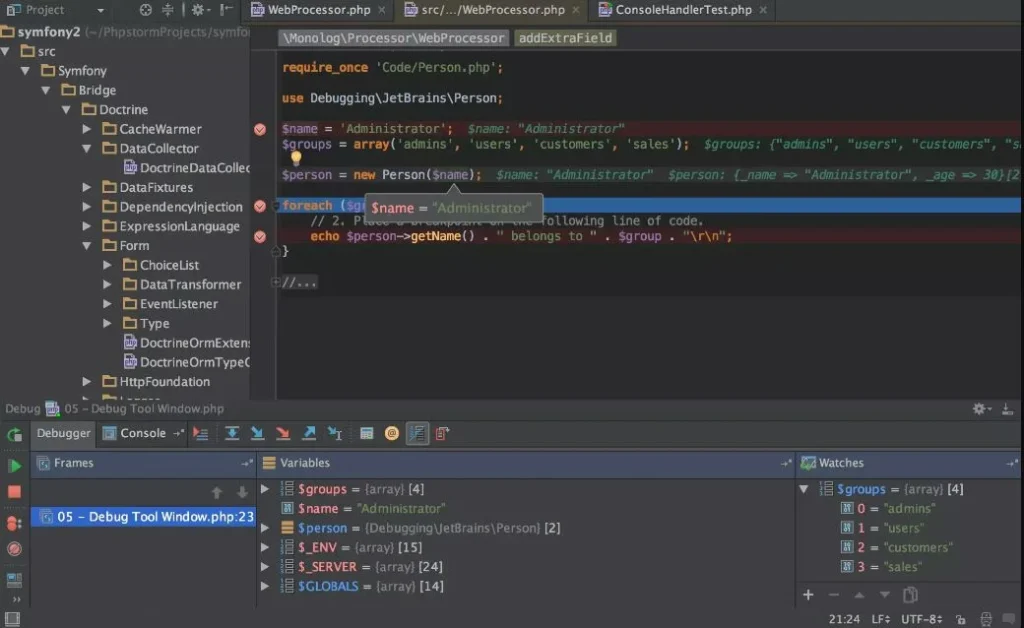
The IDE provides smart code completion, syntax highlighting, and real-time error detection. These capabilities help developers write accurate code faster. Automatic suggestions reduce manual effort while making projects easier to maintain and update over time.
Powerful Debugging Tools
PhpStorm includes advanced debugging support with Xdebug integration. Developers can inspect variables, monitor application behavior, and identify coding issues quickly. This streamlined debugging process saves valuable time during testing and application development.
Key Features
Smart Code Completion
PhpStorm analyzes your project and provides intelligent code suggestions. This minimizes typing, speeds development, and helps prevent common programming mistakes before they become larger issues.
Built-In Version Control
The IDE supports Git, GitHub, GitLab, and other version control systems. Developers software can commit changes, review code history, resolve conflicts, and collaborate without leaving the development environment.
Framework Support
PhpStorm works seamlessly with Laravel, Symfony, WordPress, Drupal, CodeIgniter, and other popular PHP frameworks. Built-in support simplifies project configuration and accelerates framework-based application development.
Database Management
Developers can connect to databases directly inside PhpStorm. They can browse tables, write SQL queries, edit records, and manage database structures without switching to separate software.
Benefits of Database Integration
Integrated database tools improve workflow efficiency. Developers can test queries, validate data, and troubleshoot database-related issues while continuing their coding tasks in one unified workspace.
Front-End Development Support
PhpStorm supports HTML, CSS, JavaScript, TypeScript, and modern frontend technologies. This makes it suitable for full-stack developers who work on both server-side and client-side applications.
Built-In Code Quality Tools
The IDE continuously analyzes source code for errors and coding standards. It recommends improvements, helping developers maintain cleaner, more consistent, and professional-quality code throughout every project.
Performance and Productivity
PhpStorm automates repetitive development tasks using code generation, live templates, and refactoring tools. These features reduce manual work while increasing coding speed. Developers spend more time creating features instead of handling routine processes.
Security and Reliability
Security remains essential for every software project. PhpStorm identifies potential coding problems and highlights possible vulnerabilities during development. Early detection helps developers create more stable and secure PHP applications.
Collaboration Made Easy
Teams benefit from integrated version control, code inspections, and project navigation tools. Developers can collaborate efficiently, review changes, and maintain consistent coding standards across multiple contributors and larger development environments.
Who Should Use JetBrains PhpStorm?
PhpStorm is suitable for freelancers, agencies, startups, software companies, and enterprise development teams. Beginners appreciate its intelligent guidance, while experienced developers benefit from advanced tools that simplify large and complex coding projects.
Advantages of Using JetBrains PhpStorm
Faster Development
Automation features reduce repetitive coding tasks. Intelligent suggestions and shortcuts allow developers to complete projects more quickly while maintaining excellent code quality.
Better Code Quality
Real-time inspections identify syntax errors, unused code, and potential issues instantly. Developers can resolve problems before deployment, resulting in cleaner and more maintainable applications.
Improved Workflow
Everything from coding and debugging to database management exists within one environment. This reduces context switching and creates a smoother, more productive development experience.
Download
Telegram ID
eMail